Phone verification and SMS consent
Modoo Designer sells personalized jewelry and QR child-safety necklaces. You can create an account and purchase without agreeing to SMS. Registering QR ownership requires phone verification.
- Open phone verification, then log in or sign up with your own account.
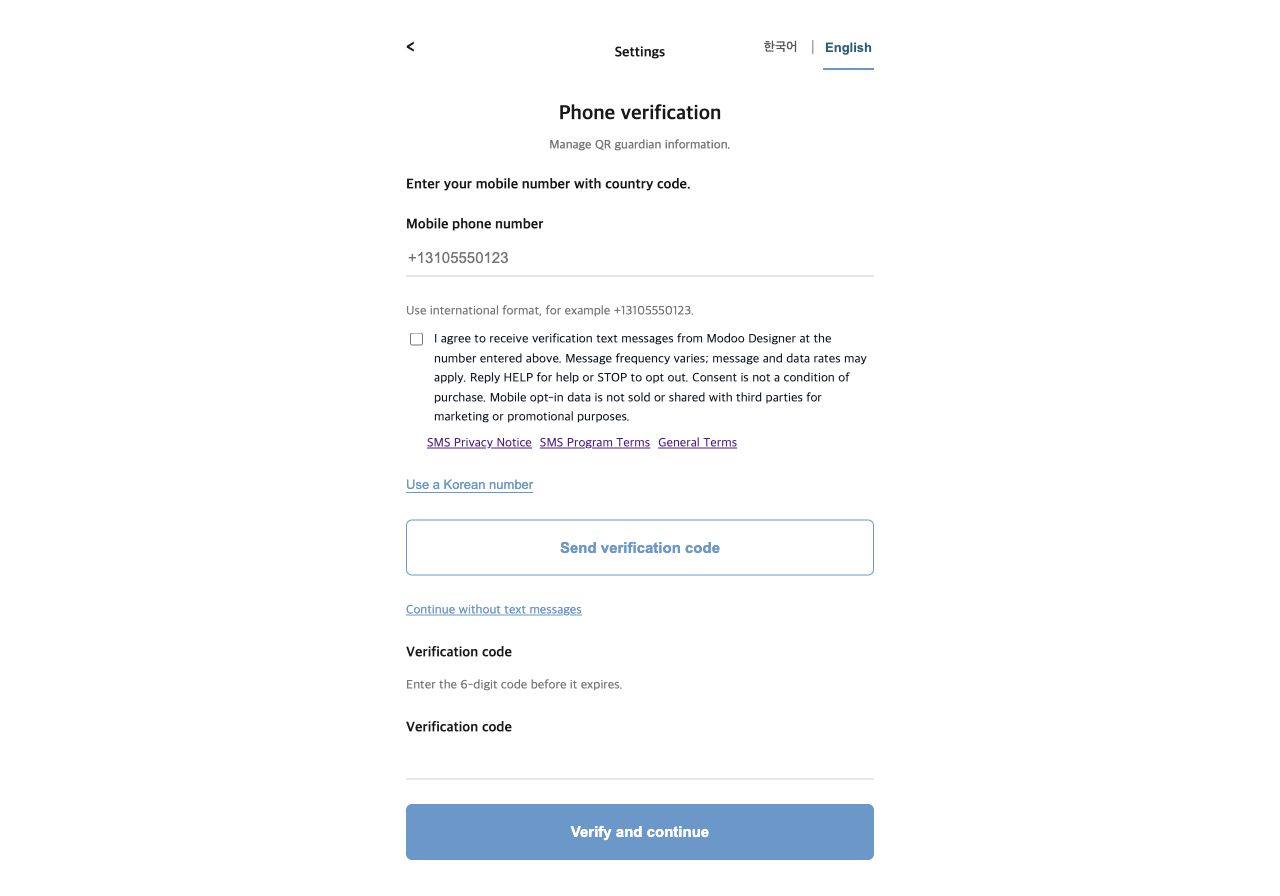
- For an international number, choose Use an international number. Enter your own mobile number including the country code.
- Read the SMS notice and policies. The separate, optional consent checkbox starts unchecked. Consent is recorded before sending.
- Request a code and enter the six digits when received. A request accepted by the provider is not proof of delivery to your phone.
Open the actual phone verification form
Availability depends on the destination country and carrier approval. If international sending is not ready, the form shows an error and does not claim verification is complete.
Public screenshot of the real opt-in form
SMS Terms · SMS Privacy · Company details
Support: modoodesigner.cs@gmail.com. Reply STOP to opt out or HELP for help where supported. Message frequency varies; message and data rates may apply. Mobile opt-in data is never sold or shared for marketing.