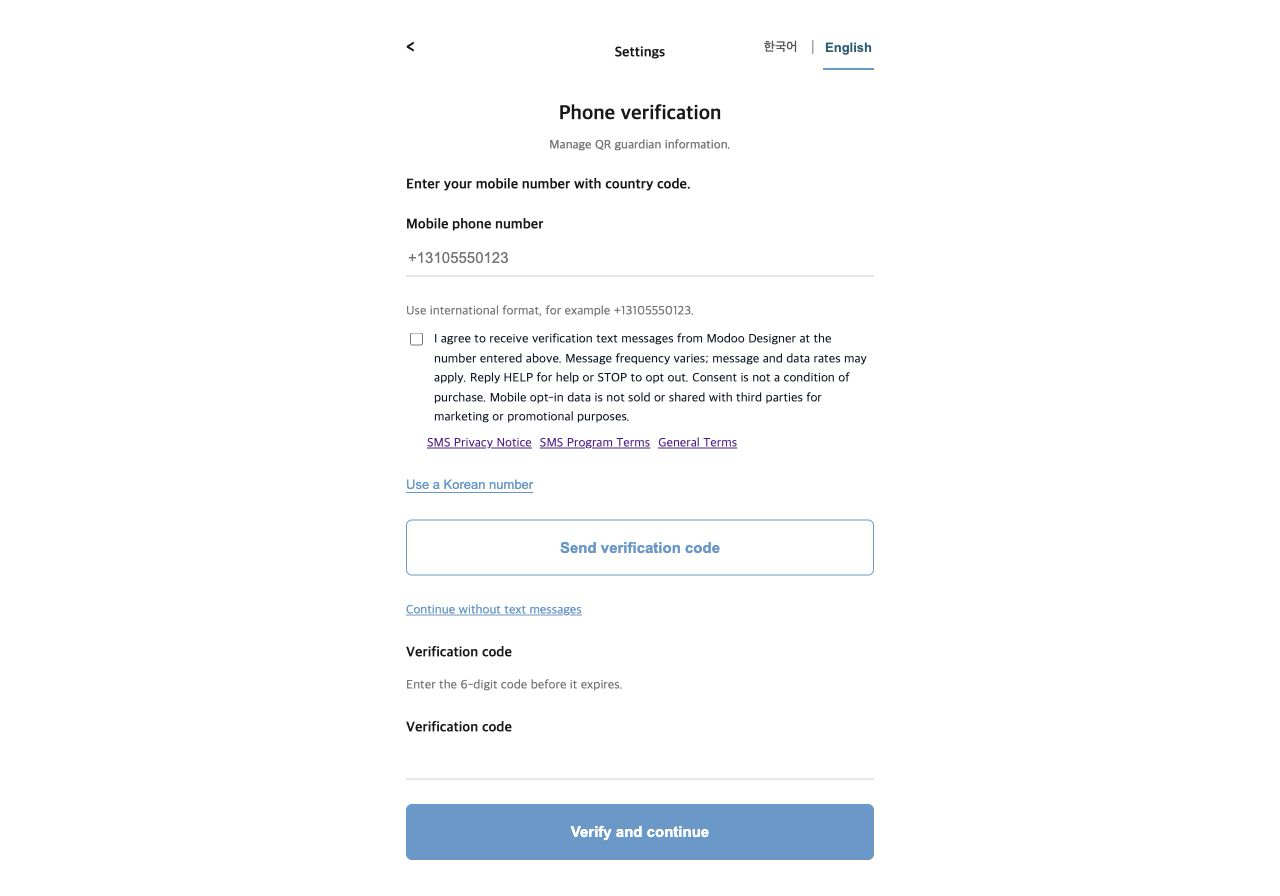
Phone verification codes
When you verify your mobile number to register QR ownership.
Modoo Designer: Your phone verification code is 123456. Do not share it. Reply HELP for help or STOP to opt out.Modoo Designer QR child safety
Modoo Designer Corp. makes engraved jewelry with a QR code for child safety. When someone finds a child wearing the necklace, they scan the code with any phone camera and can contact the guardians the owner registered. myj.ai is the service site for that QR code.
Every necklace starts as a customer's own design: a pendant shape, engraved text, a photo or drawing, and optional birthstones. We laser-engrave and ship it from our workshop in Incheon, and the QR child-safety option links the pendant to this service. These are real customer designs from our public catalog.
 #6398
#6398 #1055
#1055 #531
#531 #710
#710 #140
#140 #72
#72Text messages are used only for account security and the QR safety service. We never send marketing texts and we do not use purchased lists.
When you verify your mobile number to register QR ownership.
Modoo Designer: Your phone verification code is 123456. Do not share it. Reply HELP for help or STOP to opt out.When a finder scans a registered necklace and asks to contact a guardian.
Modoo Designer QR safety: Finder requested contact. Join: https://myj.ai/RtcCnry1 Joining shares location; call/chat available. HELP/STOP.When an ownership reset you requested is complete.
Modoo Designer: QR ownership reset is complete. Sign in to assign and configure your QR code. Reply HELP for help or STOP to opt out.Consent is collected on the phone verification form inside the account area. You enter your mobile number with its country code, read the SMS notice, and tick a separate, optional checkbox that starts unchecked. The verification code is not sent until you give consent.
Guardian alerts go only to contacts the necklace owner adds in QR settings. The owner confirms that each listed guardian agreed to receive safety alerts, and that confirmation is cleared whenever the contacts change.
Screenshot of the real opt-in form · Step-by-step guide to the phone verification form